Log in
BUILT FOR VACATION RENTAL TEAMS

Behind every great stay,
a ready operation.

From the last check-out to the next welcome.
Bring cleaning, inspections, maintenance, and statements together with Indigo.

One place for the work behind the welcome.
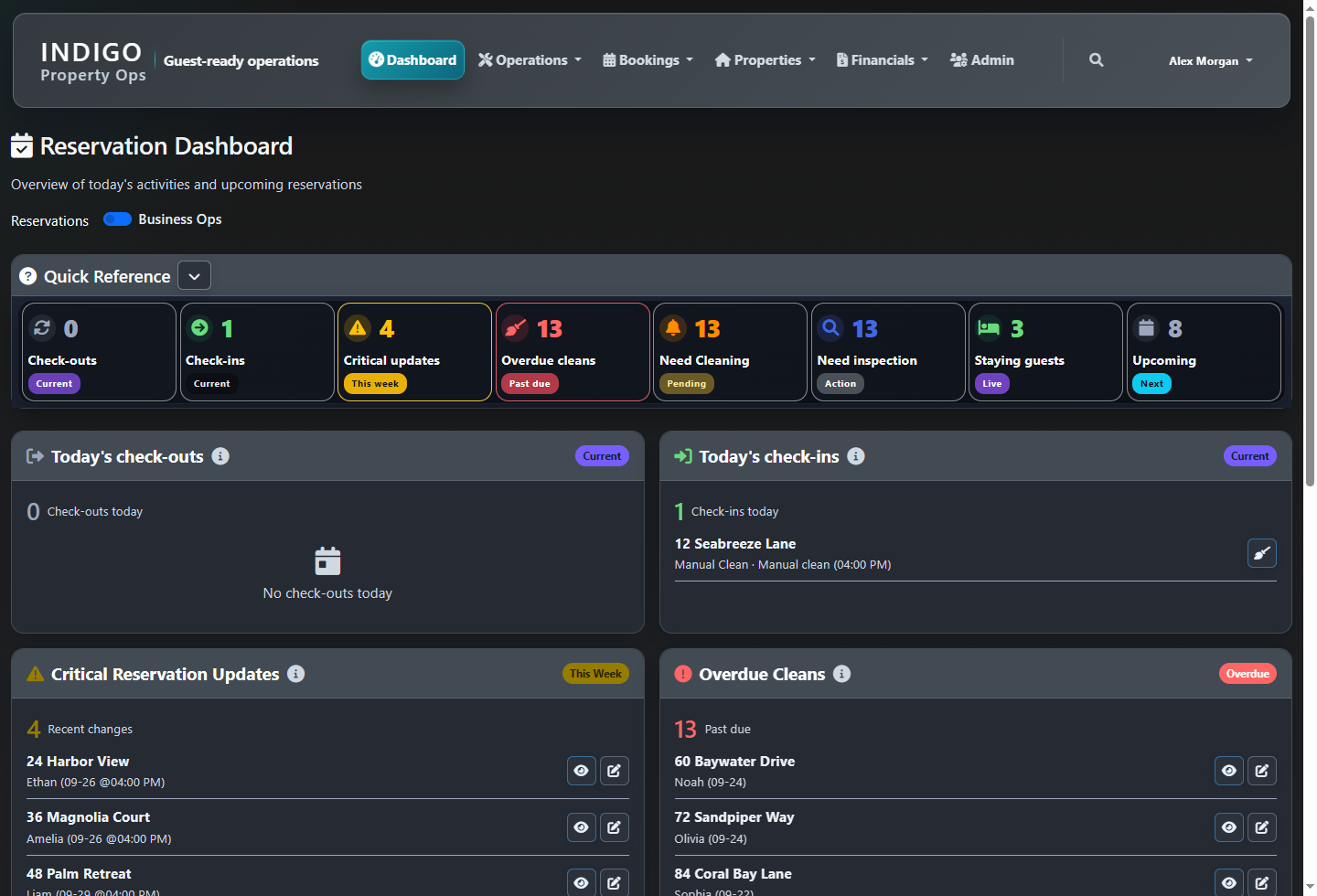
Actual Indigo Reservation Dashboard showing check-ins, check-outs, cleaning needs, inspections, staying guests, and upcoming reservations
Reservation dashboard · Today’s operation · Demo dataView full size ↗
ONE CONNECTED OPERATION

Plan the turnover Coordinate the work Check readiness Keep the records

THE INDIGO PLATFORM

Less chasing.
More knowing.

Your team works across properties. Your information shouldn’t. Indigo gives the office and field teams a shared picture of what’s next, what’s open, and what’s ready.

01

Every turnover, in view.

See check-outs, arrivals, unassigned cleans, and upcoming reservations. Plan cleaning around the time you actually have.
Cleaning schedules · Booking timelines
02

Ready means ready.

Bring cleaning, maintenance, and inspection progress together for each turnover. See what still stands between a property and its next guest.

Turnover readiness · Inspections
03

Keep the follow-up moving.

Track issues by property, priority, assignee, and due date. Find unassigned work, upcoming tasks, and jobs waiting for the next visit.

Maintenance · Contractor coordination
04

Close the operational loop.

Keep owner statements, cleaner statements, cleaning invoices, and maintenance remittance alongside your operational workflows.

Statements · Invoices · Remittance
HOW INDIGO CONNECTS THE WORK

One booking signal.
A complete operational flow.

Follow the flow from booking information through cleaning, inspections, and maintenance to guest readiness and owner finance.
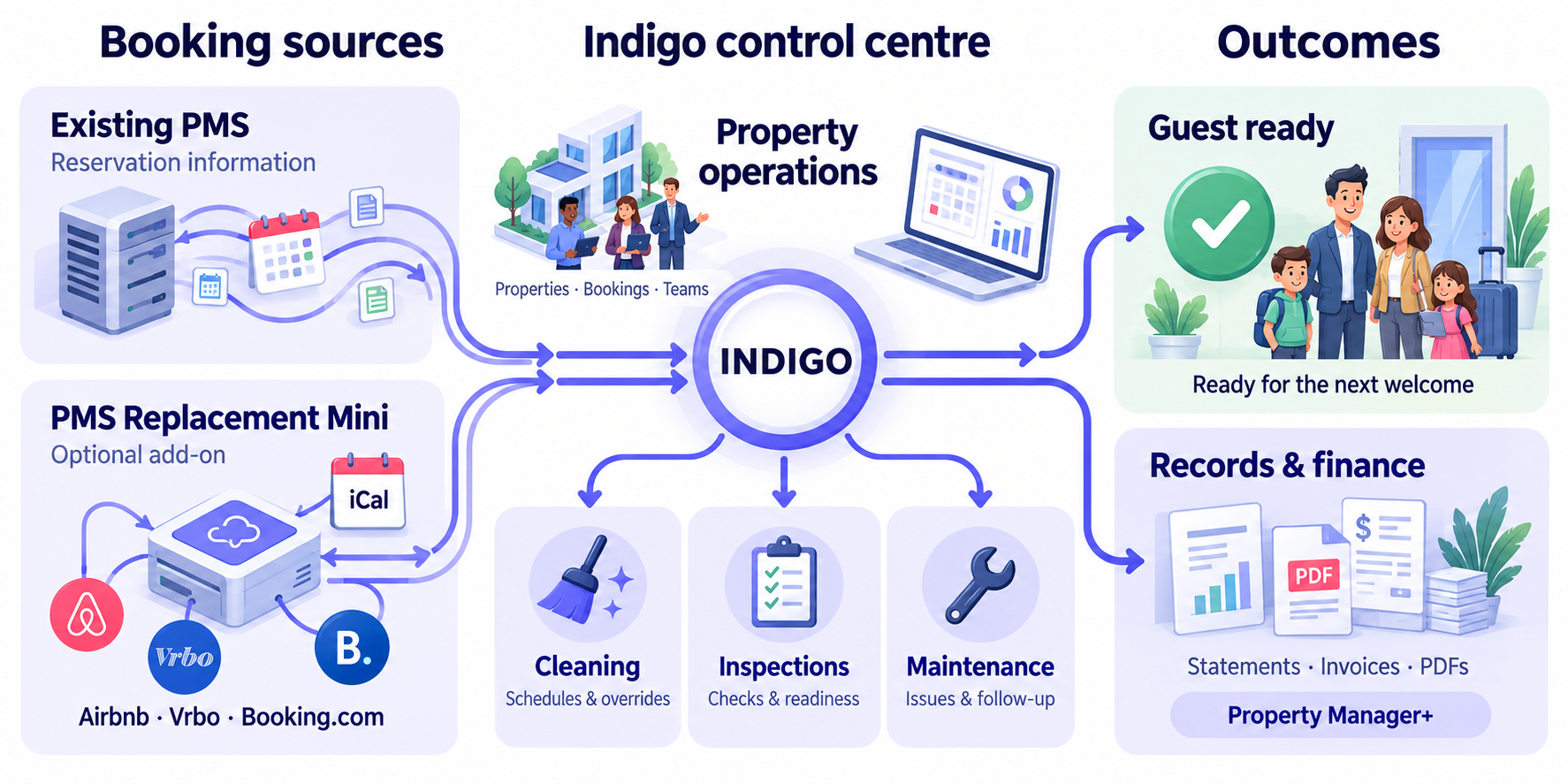
Indigo system flow: existing PMS and optional PMS Replacement Mini feed booking and property information into the Indigo control centre. Cleaning schedules, assignments and overrides, inspections and readiness checks, and maintenance follow-up lead to guest-ready properties and financial records including statements, invoices, expenses and PDFs.
From booking sources to guest-ready properties and owner reporting.View full size ↗

PMS Replacement Mini is an optional iCal add-on: owners’ booking calendars can feed Airbnb, Vrbo, Booking.com, and other compatible channels. Finance is included with Property Manager+.

BOOKINGS & CLEANING, SIDE BY SIDE

See the stay.
Plan the turnaround.

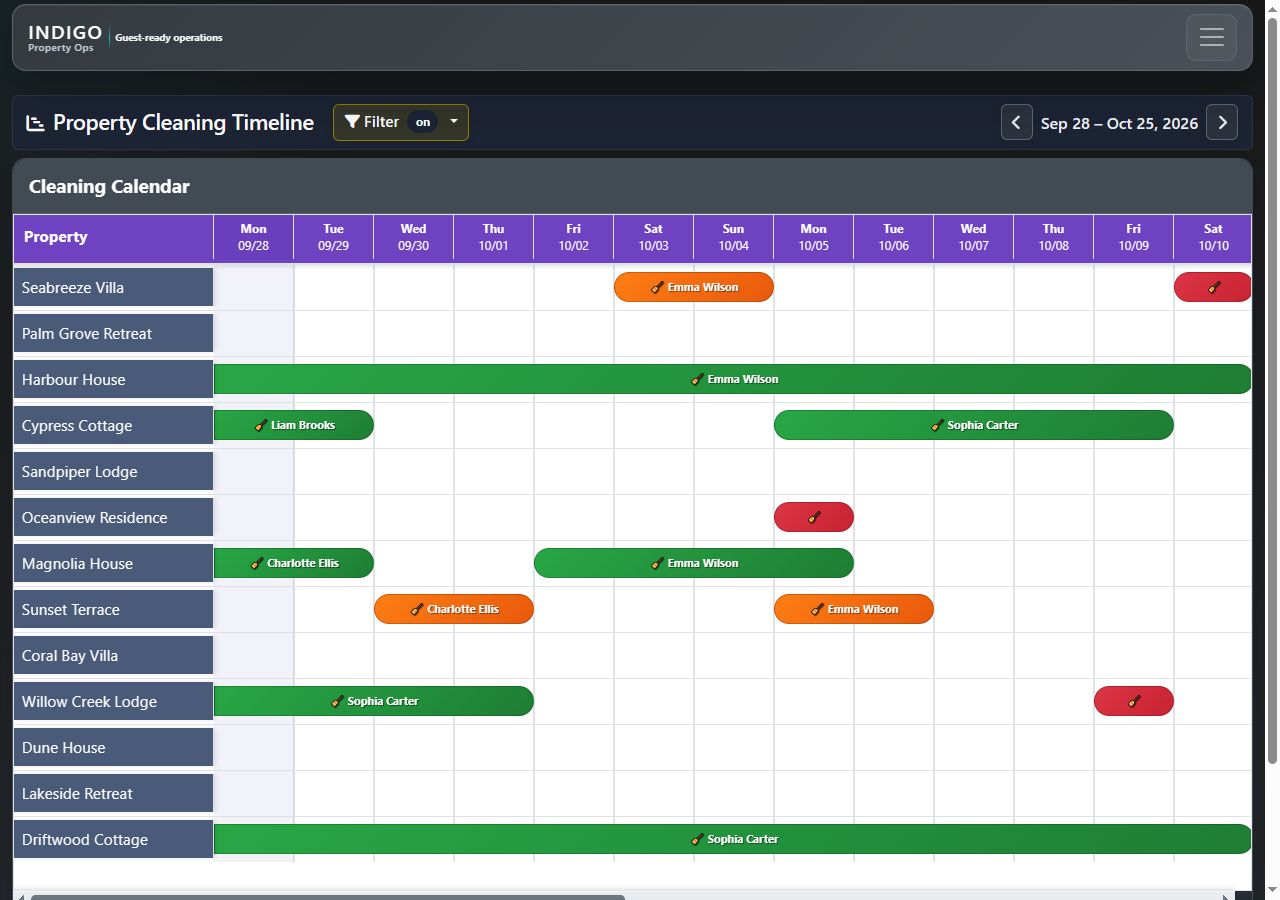
Two timelines. One view of what’s coming. Follow reservations across your managed properties, then see the cleaning windows between stays.
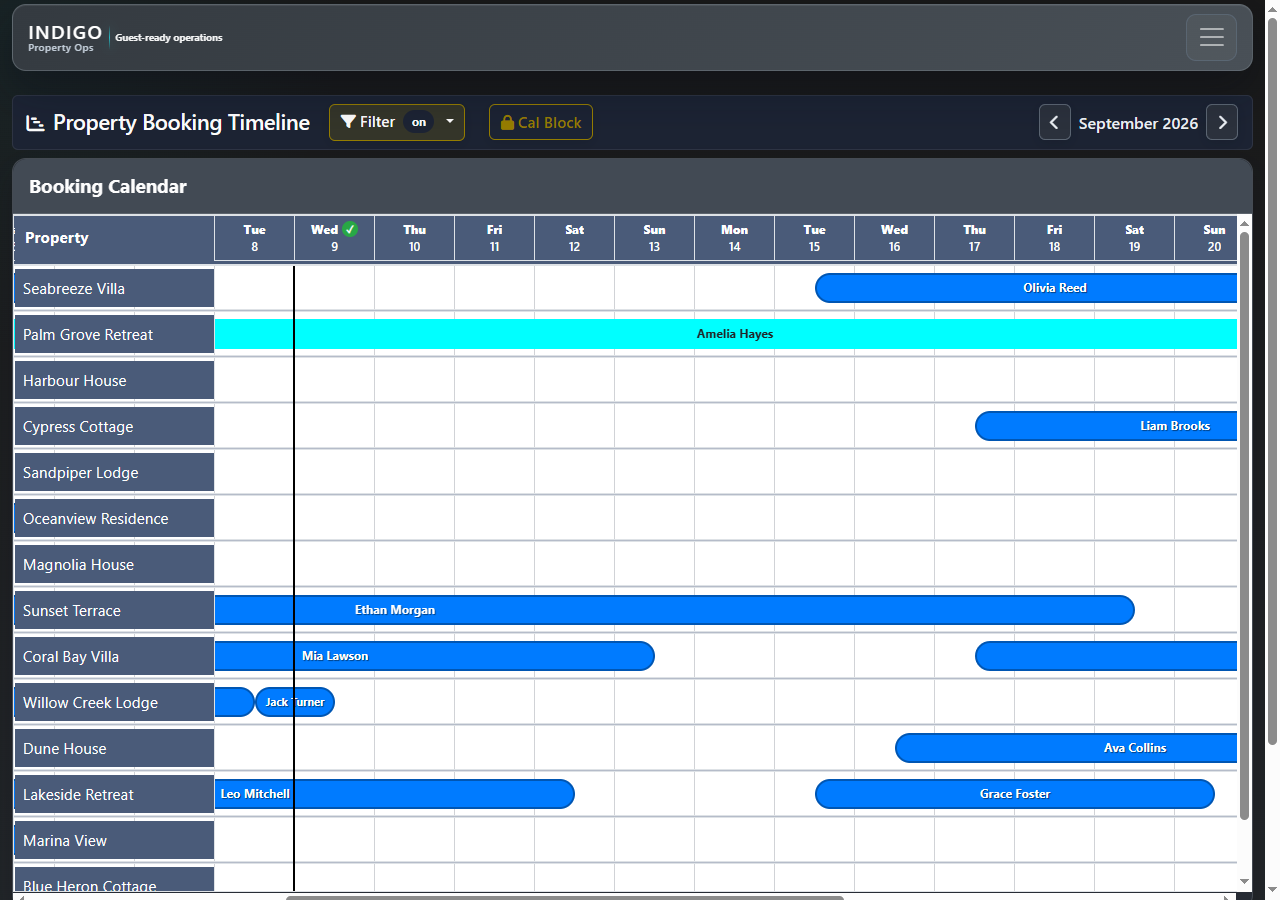
Actual Indigo screens. Both timelines are filtered to managed properties. Names and properties shown are fictional demonstration data.

A CLEARER VIEW FROM YOUR DESK

Start with today.
See what needs attention.

Check arrivals, departures, overdue cleans, inspections, current guests, and upcoming reservations from one operational dashboard.

Illustrative office scene featuring the actual Indigo reservation dashboard.
FROM THE OFFICE TO THE PROPERTY

The real workflow.
On a smaller screen.

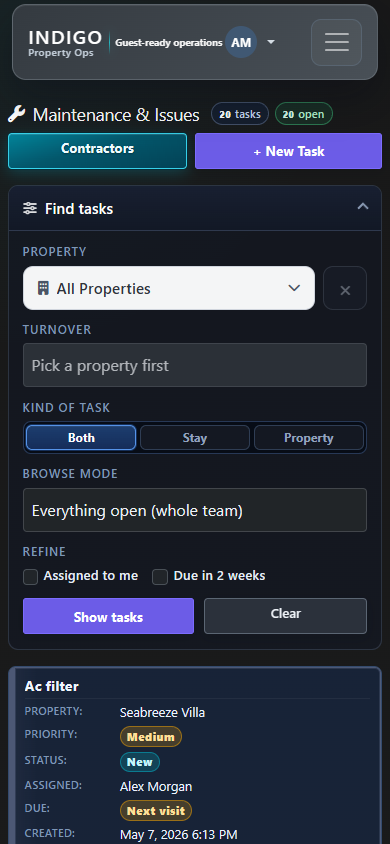
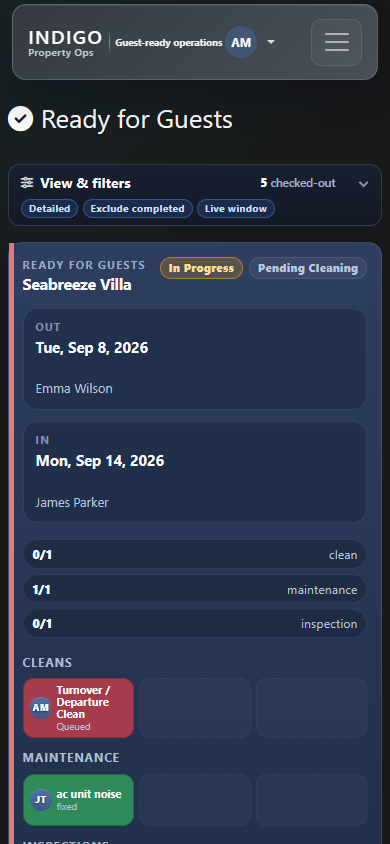
Open Indigo in a mobile browser to review guest readiness and find maintenance work while you’re away from your desk.

Actual Indigo mobile browser screens with fictional demonstration data.
BEYOND THE TURNOVER

The work is connected.
The records should be, too.

Bring the financial side of property operations into the same picture, with dedicated workflows for owners, cleaners, and maintenance contractors.
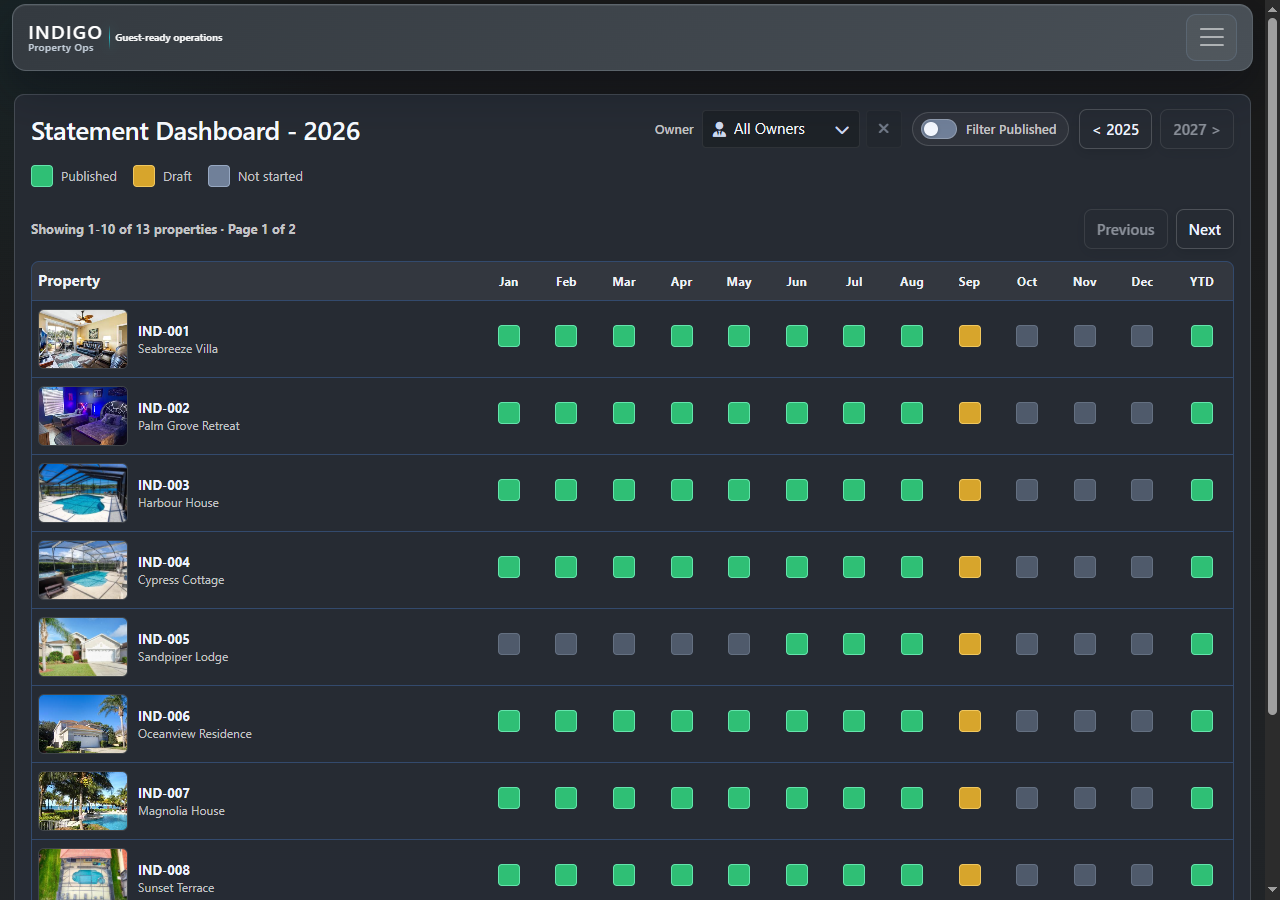
  • Track draft and published owner statements
  • Manage cleaner statements and expenses
  • Keep cleaning invoices and maintenance remittance organized
Actual Indigo Statement Dashboard showing monthly statement status by property
Statement Dashboard · Demo data · View full size ↗
THE WEEKLY CLEANING SCHEDULE

Who’s cleaning.
When. And what changed.

Review the week by cleaner, day, status, or owner. See check-out and check-in times, cleaning status, assignments, and Override controls together. Switch to Detailed View or Map View, or use PDF Export.
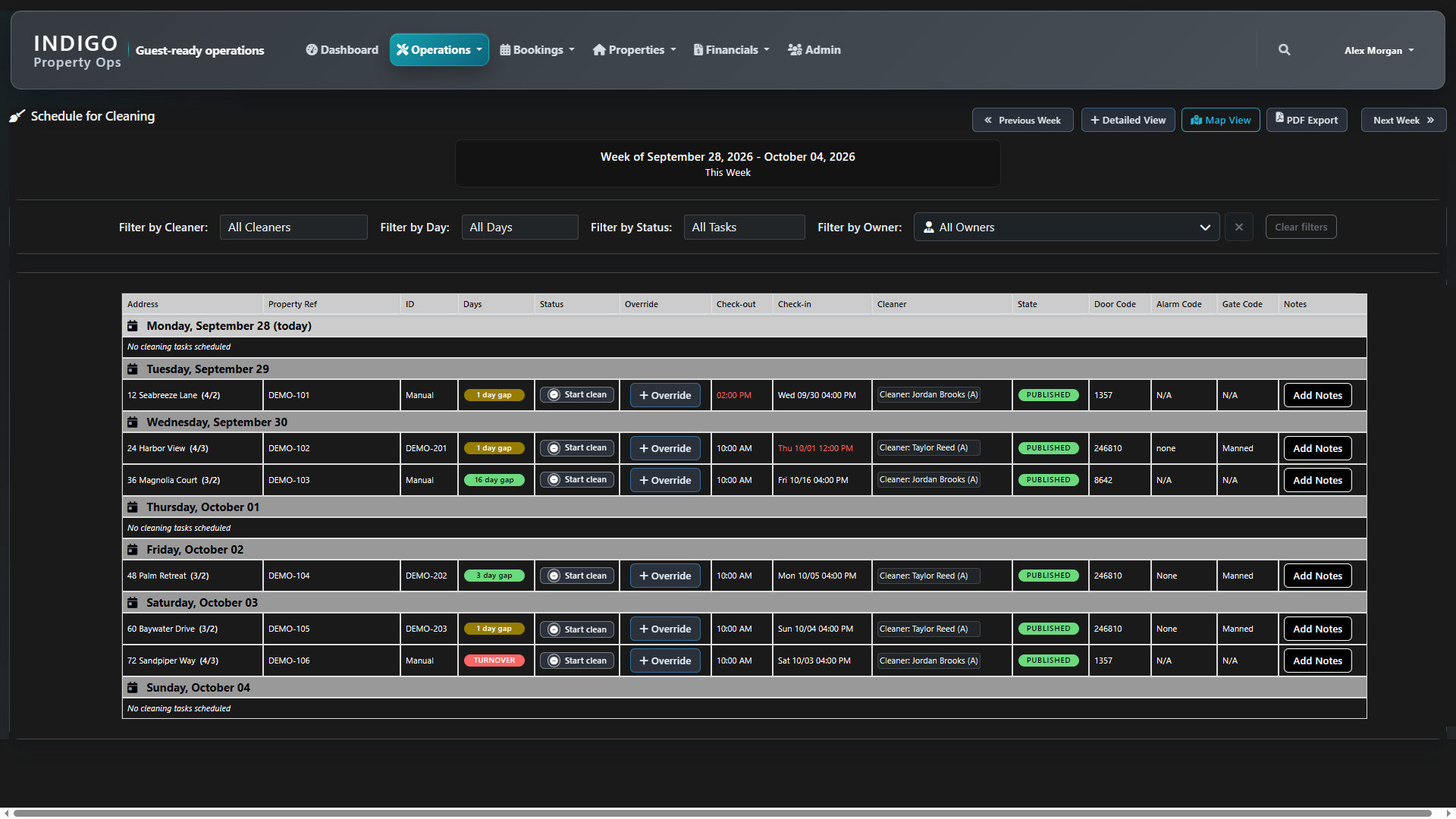
Actual Indigo weekly cleaning schedule with fictional properties, cleaners, reference numbers and access codes; showing filters, turnover gaps, status and Override controls
Actual Indigo cleaning schedule · Fictional demonstration data · View full size ↗
INDIGO FOR YOUR TEAM

The right tools.
For the work you do.

Three options for cleaning organisations and property managers. Choose Property Manager+ when you also need finance.

✓ Included · × Not included. On smaller screens, scroll across to compare all three options.

Access is scoped to your role and assigned properties. PMS Replacement Mini is an optional add-on for Property Manager and Property Manager+; it is not included in the base packages.
FeaturesCleaning Organisation

Coordinate cleaning teams, inspections, and cleaning finances.

Enquire
Property Manager

Connect bookings and property records with cleaning, inspections, and maintenance.

Enquire
Property Manager+Including Finance

Everything in Property Manager, plus owner statements and the full finance workflow.

Enquire
Overview & bookings
DashboardIncludedIncludedIncluded
ReservationsNot includedIncludedIncluded
Booking TimelineNot includedIncludedIncluded
Calendar BlocksNot includedIncludedIncluded
Import ReservationsNot includedIncludedIncluded
Operations
Ready for GuestsIncludedIncludedIncluded
Cleaning schedules & assignmentsIncludedIncludedIncluded
Manual TasksIncludedIncludedIncluded
Cleaning TimelineIncludedIncludedIncluded
InspectionsIncludedIncludedIncluded
Maintenance & IssuesNot includedIncludedIncluded
TrainingIncludedIncludedIncluded
ReportsIncludedIncludedIncluded
Properties & access
PropertiesIncludedIncludedIncluded
Property codesIncludedIncludedIncluded
Owner / Customer codesIncludedIncludedIncluded
Organization codesIncludedIncludedIncluded
InventoryIncludedIncludedIncluded
Finance
Statement DashboardNot includedNot includedIncluded
Owner StatementsNot includedNot includedIncluded
Owners & ManagersNot includedNot includedIncluded
Property Statement SettingsNot includedNot includedIncluded
Cleaning InvoicesIncludedNot includedIncluded
Cleaner StatementsIncludedNot includedIncluded
Cleaner ExpensesIncludedNot includedIncluded
Maintenance RemittanceNot includedNot includedIncluded
Statement SettingsNot includedNot includedIncluded
Administration
AdminIncludedIncludedIncluded
Optional add-on
PMS Replacement MiniOptional add-onOptional add-on
OPTIONAL FOR PROPERTY MANAGERS

PMS Replacement Mini

For owners who handle their own bookings and need calendar sharing without paying for a full PMS. Give owners an iCal availability feed to import into supported calendars on Vrbo, Airbnb, Booking.com, and other booking sites.

iCal shares calendar availability. Import support and refresh timing depend on each booking site; this is not real-time channel management or a connection for rates, payments, or guest messages.

Ask about PMS Mini

We’ll confirm the version, access, and commercial terms that fit your organisation during your demo.

01

Cleaning Organisation

Coordinate cleaning teams, inspections, and cleaning finances.

View features

Overview & bookings

  • Dashboard
  • Reservations
  • Booking Timeline
  • Calendar Blocks
  • Import Reservations

Operations

  • Ready for Guests
  • Cleaning schedules & assignments
  • Manual Tasks
  • Cleaning Timeline
  • Inspections
  • Maintenance & Issues
  • Training
  • Reports

Properties & access

  • Properties
  • Property codes
  • Owner / Customer codes
  • Organization codes
  • Inventory

Finance

  • Statement Dashboard
  • Owner Statements
  • Owners & Managers
  • Property Statement Settings
  • Cleaning Invoices
  • Cleaner Statements
  • Cleaner Expenses
  • Maintenance Remittance
  • Statement Settings

Administration

  • Admin
Enquire about Cleaning Organisation
02

Property Manager

Connect bookings and property records with cleaning, inspections, and maintenance.

View features

Overview & bookings

  • Dashboard
  • Reservations
  • Booking Timeline
  • Calendar Blocks
  • Import Reservations

Operations

  • Ready for Guests
  • Cleaning schedules & assignments
  • Manual Tasks
  • Cleaning Timeline
  • Inspections
  • Maintenance & Issues
  • Training
  • Reports

Properties & access

  • Properties
  • Property codes
  • Owner / Customer codes
  • Organization codes
  • Inventory

Finance

  • Statement Dashboard
  • Owner Statements
  • Owners & Managers
  • Property Statement Settings
  • Cleaning Invoices
  • Cleaner Statements
  • Cleaner Expenses
  • Maintenance Remittance
  • Statement Settings

Administration

  • Admin

PMS Replacement Mini is available as an optional add-on.

Enquire about Property Manager
03

Property Manager+

Including finance

Everything in Property Manager, plus owner statements and the full finance workflow.

View features

Overview & bookings

  • Dashboard
  • Reservations
  • Booking Timeline
  • Calendar Blocks
  • Import Reservations

Operations

  • Ready for Guests
  • Cleaning schedules & assignments
  • Manual Tasks
  • Cleaning Timeline
  • Inspections
  • Maintenance & Issues
  • Training
  • Reports

Properties & access

  • Properties
  • Property codes
  • Owner / Customer codes
  • Organization codes
  • Inventory

Finance

  • Statement Dashboard
  • Owner Statements
  • Owners & Managers
  • Property Statement Settings
  • Cleaning Invoices
  • Cleaner Statements
  • Cleaner Expenses
  • Maintenance Remittance
  • Statement Settings

Administration

  • Admin

PMS Replacement Mini is available as an optional add-on.

Enquire about Property Manager+
EXPLORE THE FULL PLATFORM

Every part of
property operations.

From reservations and access codes to inspections and owner statements, find the tools your office and field teams use throughout the day.

01

Operations

Keep the work between stays moving.

Ready for Guests
Review turnover readiness before the next arrival.
Cleaning
Organize cleaning schedules and assignments.
Manual Tasks
Keep additional operational tasks alongside scheduled work.
Cleaning Timeline
See cleaning windows across your properties.
Inspections
Follow inspection progress as part of guest readiness.
Maintenance & Issues
Track property issues, priorities, assignees, and due dates.
Training
Access training from the operations workspace.
Reports
Review operational reporting alongside daily activity.
02

Bookings

Understand the stays that drive your schedule.

Reservations
Review upcoming stays and reservation details.
Booking Timeline
See reservations across managed properties on a shared timeline.
Calendar Blocks
Keep blocked dates visible in your booking workflow.
Import Reservations
Bring reservation records into Indigo.
03

Properties

Keep property information within reach.

Properties
Find and manage the properties in your portfolio.
Access codes
Keep access information organized by property, owner or customer, and organization.
Property codes
Find access codes associated with a property.
Owner / Customer codes
Organize codes associated with owners and customers.
Organization codes
Keep organization-level codes together.
Inventory
Review inventory as part of property operations.
04

Financials

Connect operational work with its financial records.

Statement Dashboard
See statement status across your properties.
Owner Statements
Work with draft and published owner statements.
Owners & Managers
Keep owner and manager records organized.
Property Statement Settings
Manage statement settings for individual properties.
Cleaning Invoices
Keep cleaning invoices together in a dedicated workflow.
Cleaner Statements
Organize statements for your cleaning teams.
Cleaner Expenses
Keep cleaner expenses alongside financial records.
Maintenance Remittance
Manage remittance for maintenance work.
Statement Settings
Manage the settings behind your statement workflow.
05

Dashboard & Admin

Start with the day ahead and reach the tools behind it.

Dashboard
Review check-ins, check-outs, upcoming reservations, cleaning needs, and inspections. Switch between Reservations and Business Ops views.
Admin
Access Indigo’s dedicated administration area.
01

Operations

Keep the work between stays moving.

+
Ready for Guests
Review turnover readiness before the next arrival.
Cleaning
Organize cleaning schedules and assignments.
Manual Tasks
Keep additional operational tasks alongside scheduled work.
Cleaning Timeline
See cleaning windows across your properties.
Inspections
Follow inspection progress as part of guest readiness.
Maintenance & Issues
Track property issues, priorities, assignees, and due dates.
Training
Access training from the operations workspace.
Reports
Review operational reporting alongside daily activity.
02

Bookings

Understand the stays that drive your schedule.

+
Reservations
Review upcoming stays and reservation details.
Booking Timeline
See reservations across managed properties on a shared timeline.
Calendar Blocks
Keep blocked dates visible in your booking workflow.
Import Reservations
Bring reservation records into Indigo.
03

Properties

Keep property information within reach.

+
Properties
Find and manage the properties in your portfolio.
Access codes
Keep access information organized by property, owner or customer, and organization.
Property codes
Find access codes associated with a property.
Owner / Customer codes
Organize codes associated with owners and customers.
Organization codes
Keep organization-level codes together.
Inventory
Review inventory as part of property operations.
04

Financials

Connect operational work with its financial records.

+
Statement Dashboard
See statement status across your properties.
Owner Statements
Work with draft and published owner statements.
Owners & Managers
Keep owner and manager records organized.
Property Statement Settings
Manage statement settings for individual properties.
Cleaning Invoices
Keep cleaning invoices together in a dedicated workflow.
Cleaner Statements
Organize statements for your cleaning teams.
Cleaner Expenses
Keep cleaner expenses alongside financial records.
Maintenance Remittance
Manage remittance for maintenance work.
Statement Settings
Manage the settings behind your statement workflow.
05

Dashboard & Admin

Start with the day ahead and reach the tools behind it.

+
Dashboard
Review check-ins, check-outs, upcoming reservations, cleaning needs, and inspections. Switch between Reservations and Business Ops views.
Admin
Access Indigo’s dedicated administration area.

See how these workflows fit your portfolio.

Request a demo
SEE INDIGO IN ACTION

Your properties.
A clearer working day.

Request a demo to explore bookings, cleaning, property operations, and financial workflows with us.

Let’s talk about your operation.

Tell us a little about your team and we’ll help you find the right Indigo version.

We’ll use these details to respond to your enquiry. Read our Privacy Policy. Please don’t include guest details, passwords, or access codes.