Vacation rental cleaning software built for cleaning companies
Updated
Answer in brief
Cleaning companies that turn over Airbnb and Vrbo homes usually need software built for the cleaning business rather than the host: it plans cleans around the time between stays, assigns cleaners, checks each home is guest-ready, and keeps cleaner statements, expenses and client invoices. Indigo's Cleaning Organisation version covers cleaning schedules and assignments, a colour-coded Cleaning Timeline, inspections, Ready for Guests and cleaning finances, with access scoped to each person's role.
Most scheduling tools give a cleaning company a calendar of check-outs. That's a start, but it isn't how the work actually runs. A cleaning company that turns over Airbnb and Vrbo homes for several hosts or managers has to know how much time there really is between stays, who is going, what changed overnight, whether the home is truly ready for the next guest, and what to pay the cleaner and bill the client when the job is done.
This guide is for the owner or operations lead of that kind of company. If you're outgrowing spreadsheets, group texts and month-end invoicing by hand, it covers what to look for in software, then walks one turnover week through Indigo's Cleaning Organisation version so you can see how those pieces fit together.
Why host software doesn't always fit a cleaning company
A lot of vacation rental software is built from the host's side: one owner or manager, their calendar, their properties, their guests. That works well for the job it was designed for.
A cleaning company's job is different:
- Many clients, one team. You clean for several hosts or managers at once, so you need one view across everyone's properties, not one calendar per owner.
- Your own cleaners. You already employ or contract your team. What you need is to plan their week and adjust it when bookings move.
- Your own billing. You pay cleaners, track their expenses, and invoice the hosts or managers you work for. Those records belong to your business, not your client's.
- Proof of work. Your clients want to know the home is ready. A completed checklist or inspection protects you when questions come up.
None of this means host tools are bad. Some cleaning companies get on fine with the tools their clients already use. But if you're the one running the team, scheduling the week and sending the invoices, it's worth looking at software built around that job.
What to look for: a buyer's checklist
Use this list when you compare tools, including Indigo. Each item says why it matters.
1. A schedule built around the cleaning window, not just the check-out date
A check-out date tells you a clean is needed. The cleaning window — the time between one guest leaving and the next arriving — tells you how urgent it is. A same-day turnover with a tight window needs your most reliable cleaner first thing; a home with no arrival for three days can wait. Look for software that shows the window, not only the date.
2. Assignments and same-day changes
Bookings move. Guests extend, check in early, or cancel. Look for a weekly view you can sort by cleaner and by day, with check-out and check-in times next to each assignment, and a clear way to override the plan when something changes so the team sees the new version.
3. Inspections and a "ready for guests" check
A finished clean isn't the same as a ready home. Look for inspections and a simple status that shows what still stands between the property and its next guest. This is the record that protects your company when a host asks "was it done?"
4. Manual tasks next to the scheduled cleans
Not every job comes from a booking. Deep cleans, restocks and one-off requests need to sit on the same schedule as turnovers, or they get missed.
5. Cleaner statements, cleaner expenses and cleaning invoices
This is where many small companies lose hours each month. Look for software that keeps what each cleaner is owed, the expenses they've claimed, and the invoices you send to clients alongside the operational record, so the finance side follows from the work rather than being rebuilt in a spreadsheet.
6. Access by role and assigned property
Cleaners should see their own work, not every client's codes and records. Look for access scoped to each person's role and the properties they're assigned to.
7. Works on the phone your cleaners already carry
Your team is in the field. Check how the software works on a phone — a native app or a mobile browser — and whether you can share the week's plan, for example as a PDF.
8. Inventory and par levels
Running out of toilet paper or clean linen is a guest complaint waiting to happen. Look for inventory tracked by property and room, with par levels and a way to flag count differences.
9. Training that follows the work
New cleaners and coordinators need to learn the system quickly. Look for onboarding organised by role, using example data rather than live client information.
How Indigo's Cleaning Organisation version handles a turnover week
Here's how the checklist maps onto Indigo, following one week from planning to paperwork. Screens below use fictional demonstration data.
Fictional demonstration data
Start with the Cleaning Timeline
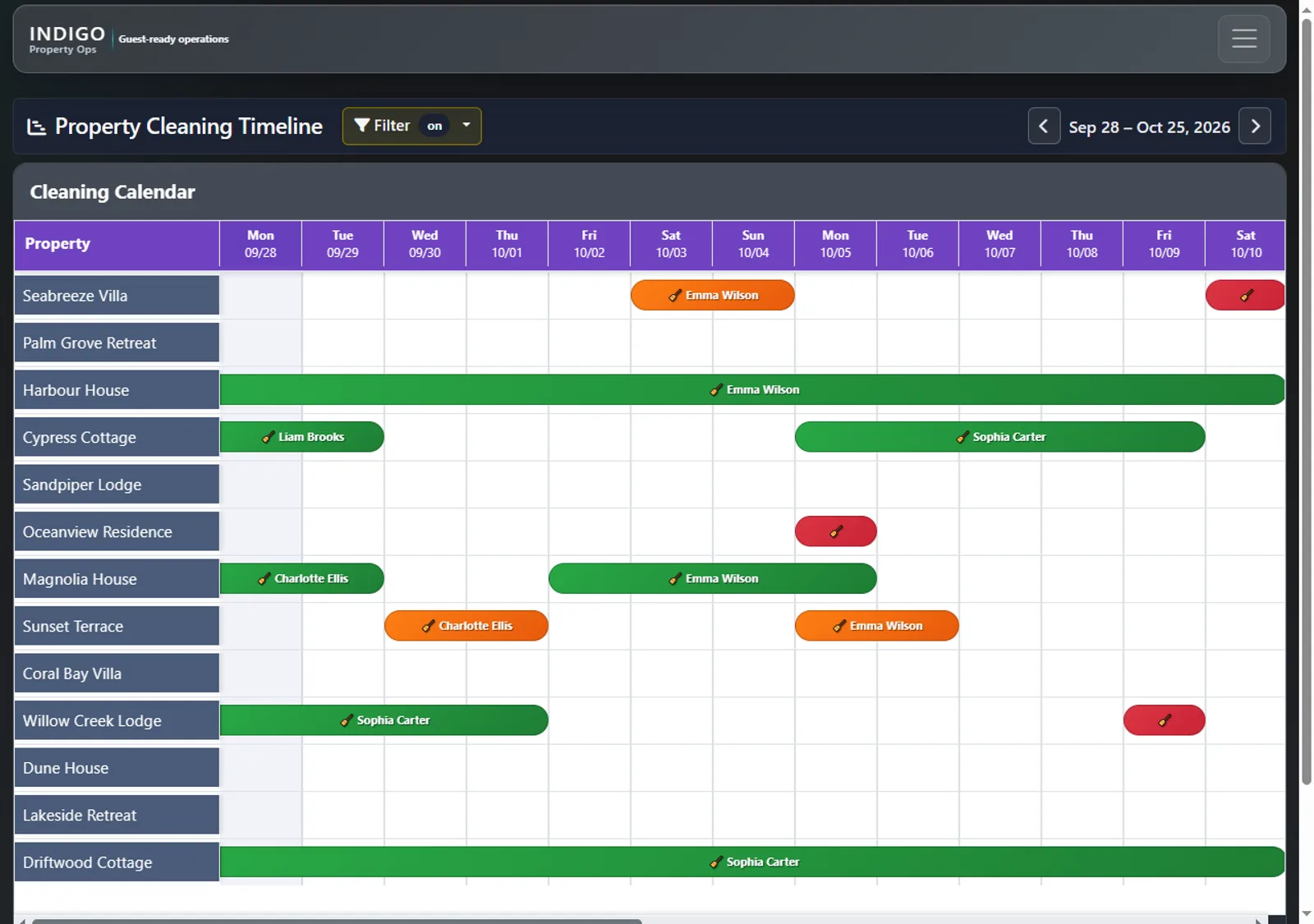
The Property Cleaning Timeline turns each stay into a visible cleaning window, showing the time between stays with colour-coded windows that highlight how urgent each turnover is. Before you assign anyone, you can see where the week is tight and where there's slack.
Fictional demonstration data
Plan the week on the weekly cleaning schedule
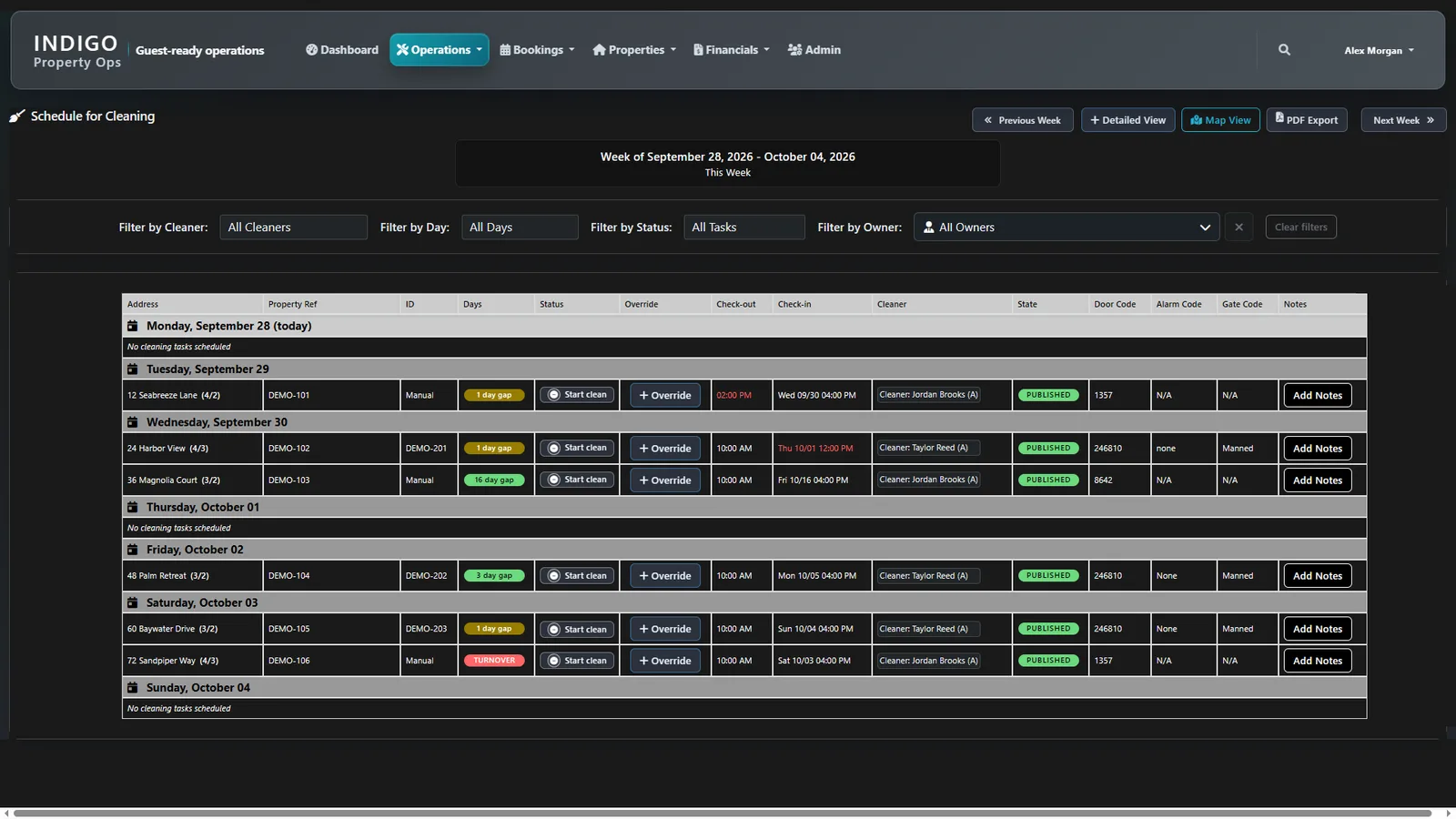
The weekly cleaning schedule lets you review the week by cleaner, day, status or owner. Check-out and check-in times, cleaning status, assignments and Override controls sit together, so when a booking changes you can reassign the clean without losing track of the rest of the week. You can switch to Detailed View or Map View, or use PDF Export to share the plan with the team.
Not every job comes from a booking, so Manual Tasks let you add deep cleans, restocks or one-off requests to the same operation.
Your schedule is built from your clients' booking information; ask during the demo how that connects for the clients and systems you work with.
Fictional demonstration data
Check readiness with Inspections and Ready for Guests
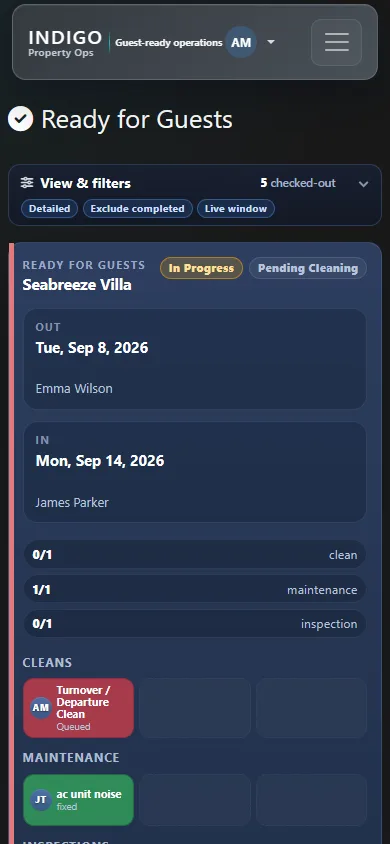
Inspections and Ready for Guests bring cleaning and inspection progress together for each turnover, so you can see what still stands between a property and its next guest. Indigo works in a mobile browser, so a supervisor in the field can check readiness from their phone.
Keep supplies on track with Inventory
Inventory is organised by property, room and item. You can track par levels, flag count differences, prepare cleaning checklists and start an inventory audit from the property record.
Close the loop: cleaner statements, expenses and invoices
When the week is done, Cleaner Statements, Cleaner Expenses and Cleaning Invoices keep the money side next to the work that produced it. You don't rebuild the week in a spreadsheet to work out who's owed what or what to bill each client.
Who sees what
Access is scoped to each person's role and assigned properties, and Indigo's onboarding follows the work each person actually does: choose the right role, follow a real workflow, and practise with clear examples using demonstration data rather than live client information. Reports and an operational Dashboard — arrivals, departures, overdue cleans, inspections and upcoming reservations — give the office a view of today.
What the Cleaning Organisation version includes (and doesn't)
Indigo comes in three versions: Cleaning Organisation, Property Manager and Property Manager+. Here's the Cleaning Organisation version, from the plan table on our homepage.
| Included | Not included |
|---|---|
| Dashboard, Ready for Guests | Reservations, Booking Timeline, Calendar Blocks, Import Reservations |
| Cleaning schedules & assignments, Manual Tasks, Cleaning Timeline | Maintenance & Issues |
| Inspections, Training, Reports | Owner statements and the Statement Dashboard |
| Properties, property / owner / organization codes, Inventory | Maintenance remittance |
| Cleaning Invoices, Cleaner Statements, Cleaner Expenses | iCal Export (available in the Property Manager versions) |
| Admin |
If you also manage properties and need maintenance tracking, booking timelines or owner statements, the Property Manager or Property Manager+ versions cover those. Compare all three versions.
We'll confirm the version, access and commercial terms during your demo.
Indigo and the other options
There are good tools in this space, and the right one depends on how your business works. Broadly you'll see two kinds:
- Host-side operations tools and marketplaces. Built around a host or manager's properties. Some help you find cleaners; others coordinate the host's own team. They're a strong fit when the host runs the operation.
- Software for cleaning companies. Built around the cleaning business: many clients, your own crew, and your own invoicing and cleaner pay. Many list their prices on their sites, so compare those directly.
Indigo sits with the second group for the Cleaning Organisation version, with a particular focus on the cleaning window, readiness and inspections, and keeping cleaner statements, expenses and invoices with the operational record. Whatever you choose, run your own real week through a demo or trial and check each item on the list above.
Related: See how the weekly cleaning schedule and the financial workflows look on the homepage, or how the whole workflow connects.
FAQ
What software do Airbnb and vacation rental cleaning companies use?
Many use software built for the cleaning business rather than the host. It plans cleans from booking dates, assigns cleaners, checks each property is guest-ready, and handles cleaner pay records and client invoices. Indigo's Cleaning Organisation version covers cleaning schedules and assignments, a Cleaning Timeline, inspections, Ready for Guests, cleaner statements, cleaner expenses and cleaning invoices.
What should cleaning-company software do that host software doesn't?
It should work across many clients' properties at once, show the cleaning window between each check-out and check-in, let you reassign cleaners when bookings change, and keep cleaner statements, expenses and invoices for the clients you bill. Host tools are usually built around one owner's calendar; a cleaning company needs its own team, schedule and records.
How do I schedule cleaners around tight same-day turnovers?
Start from the time between stays, not just the check-out date. In Indigo, the Cleaning Timeline shows each stay's cleaning window, colour-coded by urgency. The weekly schedule then shows check-out and check-in times, assignments and Override controls by cleaner, day, status or owner, with PDF Export to share the plan.
How do I prove a property is ready for the next guest?
Use inspections and a clear readiness status rather than relying on a cleaner's message. In Indigo, Inspections and Ready for Guests bring cleaning and inspection progress together for each turnover, showing what still stands between the property and its next guest. That record helps when a client asks whether a home was done.
How do I handle cleaner pay, expenses and invoices for my clients?
Keep them next to the work instead of rebuilding them in a spreadsheet at month end. Indigo's Cleaning Organisation version includes Cleaner Statements, Cleaner Expenses and Cleaning Invoices alongside the schedule and inspections, so what each cleaner is owed and what each client is billed follow from the jobs that were done.
Can my cleaners use it on their phones?
Yes. Indigo works in a mobile browser, so your team can review guest readiness and find their work from a phone while away from a desk. Access is scoped to each person's role and assigned properties, so cleaners see their own work rather than every client's records.